Hey AirtelTrickianz, In this Guide, I will tell you that how can you Increase App Storage Memory in MTK Chipset Android Phones. These days, Android Operating System Phones are much popular. Many of the android users, using Low Budget phones. In Low Budget Phones, You will see that there is the MTK Chipset in Low end Phones. So obviously, if you are using low-end, & low price phone then you will get Low Internal Memory in it, & Lower App Storage.
But if you want to Install more & more apps, & fed up with Low app storage memory error, then here is a solution for you. You can Increase App Storage Memory of your phone, which is powered by MTK Chipset. Remember that, which Guide will work only if you are using android phone, which comes with MTK Processor. This Guide will work Perfectly without pc.
 What is MTK Chipset ?
MTK is a Company, which is providing cheaper Processors for Android phones, so people can Enjoy Android phones, at very low price. These Chipsets comes with a Series, like 6582, 6592 & much more series are available.
In every phone, you will see different MTK Series. Micromax Providing most of the android phones, which are Powered by MTK Chipset. Also there are some other companies, which are providing MTK Chipset phones, but very few models are available like Sony, Samsung companies.
Requirements Before Follow This Guide
• Rooted Android Phone
• MTK Chipset Android Phone
•
HK Rom Editor app
• This Guide will Formal All your Userdata, So Before follow this guide make sure you have done complete backup of your phone.
How to Increase app Storage in MTK Android Phones
1. At First, You need Rooted Android phone, if you are already rooted then you can proceed to next steps. else you should follow guide for root android phone, which is available above.
2. Now, Install & Open HK Rom Editor app in your Phone, Which you was downloaded from above link.
3. Now, Open
HK Rom Editor app, It will ask you For Root Permissions, Just Click on Allow Button for Allow Root permission, it’s necessary because this app will not work without rooting your phone.
4. Here it will show you your Phone’s MTK Chipset Model name, Just Click on It & it will open a new panel.
5. It will show you All Memory Info about your Phone, How much Storage is available or not & some other System values.
6. Now, Choose How much storage you want, which will work as app Storage in your Phone. Remember that, it will decrease Amount from internal memory, which you Use for Place files, songs, movies etc & it will transfer space from storage to app memory.
7. After Select Memory of your Choice, Simply Tap on
Apply Button
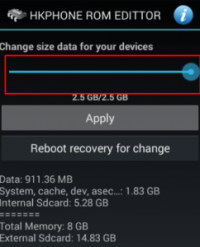
8. It will Start Processing your Request, & it will take some minutes to complete your Request. as i experienced, it will not take more than 5 minutes.
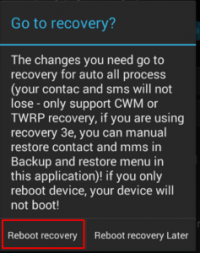
9. Now, In some time it will show you a another pop up, in which it will ask you to choose, if you want to reboot now or later, for settings to take place & remember that
it will wipe all data of your phone. including all contacts, sms, apps etc. so better that you should backup your data first, before follow this Guide.
10. Now, Choose
Reboot Recovery Button from the List. It will reboot your phone into recovery & wipe all data.
11. Then, it will automatically reboot your phone, Now Goto
Settings – Apps. you will see that your App Storage memory have been increased successfully.
I have Personally Tested this on Micromax Unite 2 & this Guide is working awesome without any Issues at All.